This morning we rolled out a round of new features and upgrades to SHOUTcast Widgets v10. Here's what's new and what, if anything, you need to do.
The AI Site Builder now runs on Claude
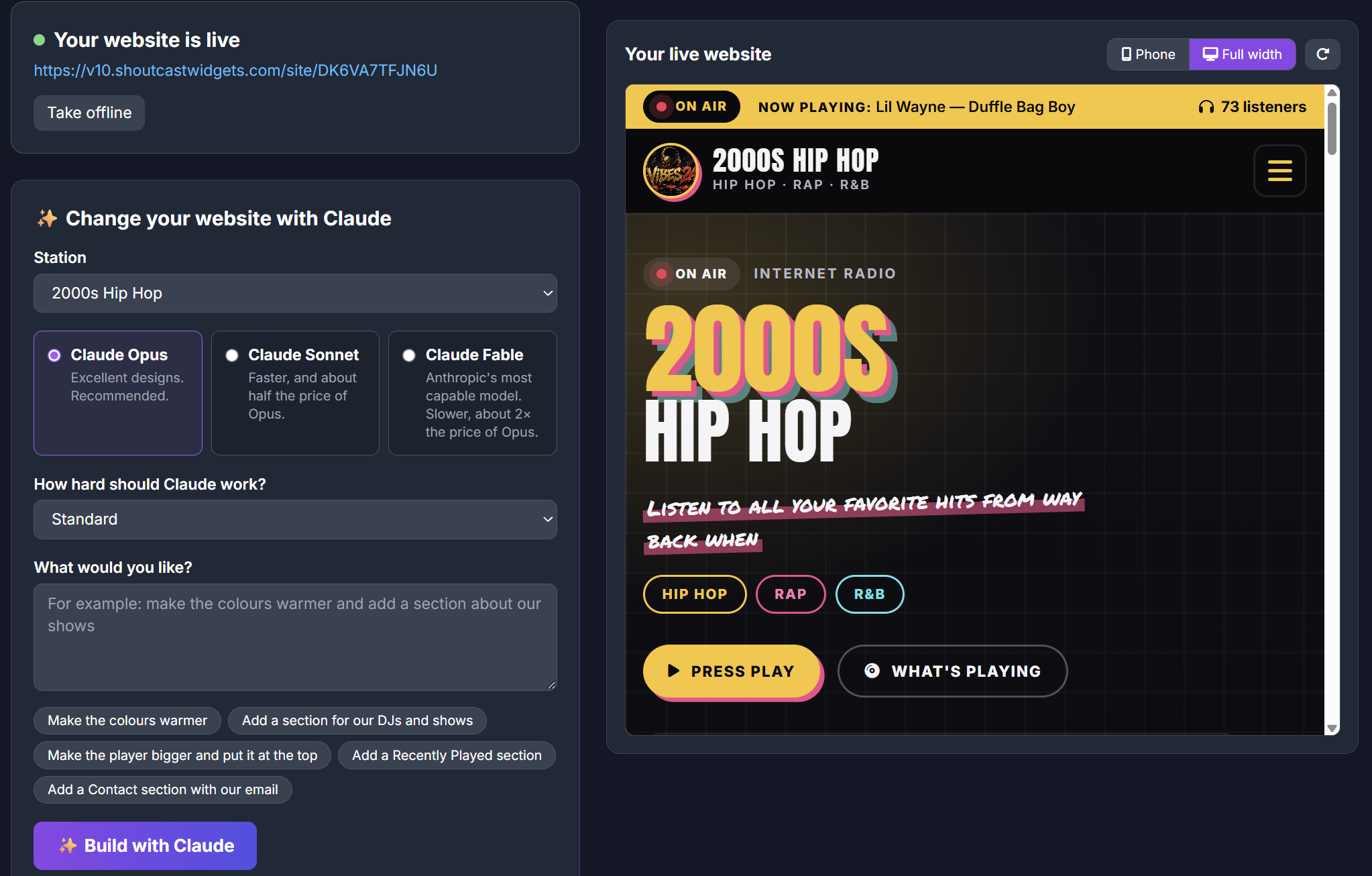
We rebuilt the AI Site Builder from the ground up around Claude by Anthropic. Describe the website you want in your own words, and Claude designs and builds a complete station website, with your player, now playing, recently played, DJs, schedule, listener map and weather built in.
Check out the live demo -- this cost us $0.42 to build using one simple sentence "build new hip hop themed website with enhanced header and footer" and was done in just a few minutes https://v10.shoutcastwidgets.com/site/DK6VA7TFJN6U
- Choose your model: Claude Opus (recommended), Claude Sonnet (faster, about half the price) or Claude Fable (Anthropic's most capable model). You always get the newest version.
- Watch it build: follow each step, read Claude's notes and see your new site appear in the preview. A build takes a few minutes, and you can leave the page while it runs.
- Nothing goes live by accident: every build is a draft. Check it on phone and desktop sizes, then publish it or discard it.
- Change your mind any time: your last 15 versions are saved, and any of them can be brought back.
- Your Claude account, one click away: buttons for the Claude Console, Billing & credit and API keys are right on the page.
- Safer for your visitors: AI-built websites now run in a protected browser sandbox.
What you need to do: the AI Site Builder now works only with Claude. Open AI Site Builder under Widgets & Website and follow the steps to connect your own Claude API key (it takes about two minutes, and $5 of credit is plenty to start). You pay Anthropic directly for what you use, and a build usually costs well under $1 with Opus. Your key is stored encrypted.
If you already built a website with the earlier AI builder, it's safe: it has been moved into the new builder and appears under Versions, and a published site stays live. Websites in the sandbox can't use contact forms or cookies, so if a feature on an older AI-built site stopped working, ask Claude to rebuild that section (it uses an email link instead of a form).
Weather Widgets, upgraded
All four weather widgets have new designs and more detail:
- Current Weather: live local clock, today's high and low, humidity, wind and gusts, UV, pressure, visibility, dew point, an air-quality meter, an hourly forecast and sunrise/sunset.
- Forecast: up to 10 days, as wide cards or a compact list with temperature-range bars, plus rain chance, wind and UV.
- Sun & Moon: a sun-path arc showing where the sun is now, a countdown to sunrise or sunset, daylight length, golden hour, a drawn moon phase and the next full and new moon.
- Alerts: active warnings sorted by severity, with expandable details and "what to do" advice. Duplicate and expired alerts are hidden.
- Make them match your site: five styles (your theme colours, a Sky style that changes with the weather, Dark, Light and Glass), plus compact, transparent and auto-refresh options. Times now show in the location's own time zone.
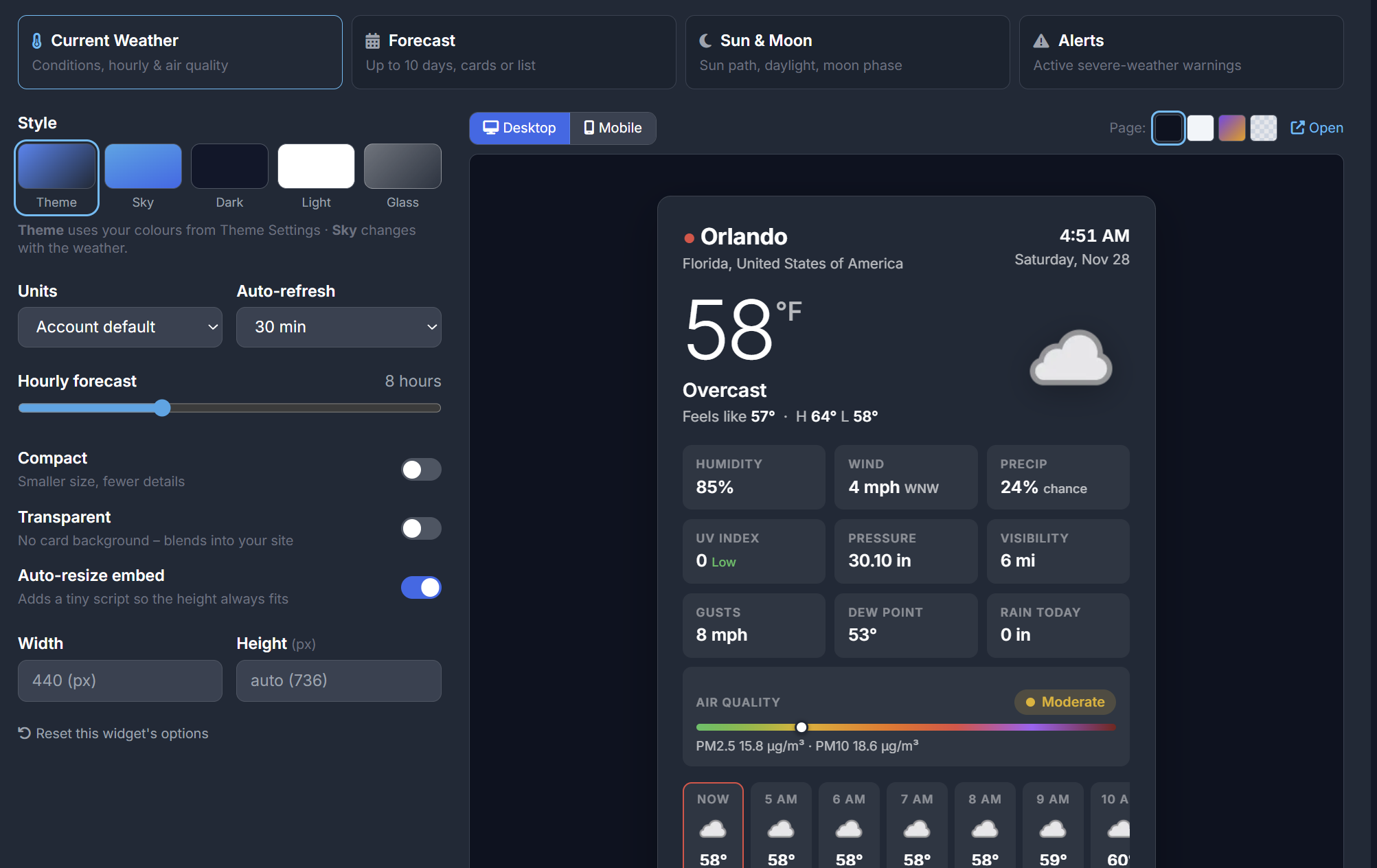
The Weather Widgets page is now a live widget builder. Search for your location (or use your current location), pick a widget, adjust it and copy the embed code. Embed codes now work correctly on other websites, and they can resize themselves to fit.
Stay signed in
You'll be signed out far less often:
- Remember me on the sign-in page now works (and is ticked by default): stay signed in for 30 days.
- Without it, you stay signed in for 12 hours of inactivity, and closing your browser no longer signs you out.
- An open panel tab keeps you signed in, and if your session does end, the panel tells you before you lose unsaved work.
As part of this change, everyone was signed out once this morning. Just sign in again.
Fixes
- The live player, listener map and weather widgets now load correctly on AI-built websites.
- Listener maps on AI-built websites no longer show "Access blocked" map tiles.
- Song voting in the players keeps working on pages where the browser blocks saved data.
Questions or something not working as expected? Open a support ticket and we'll take a look.