
Streaming Center is extremely versatile and will play music regardless if you have set your playlist and scheduler up correctly or not. For the most part, Streaming Center plays tracks at random, however using features like the scheduler, blocks and toggling a couple settings can deliver the exact mix of tracks your seeking for your listeners.
Event Scheduler
You should first have at least one playlist set up with tracks in it. To create a new event in Streaming Center, click on Schedule in the left then the New event button on the right. 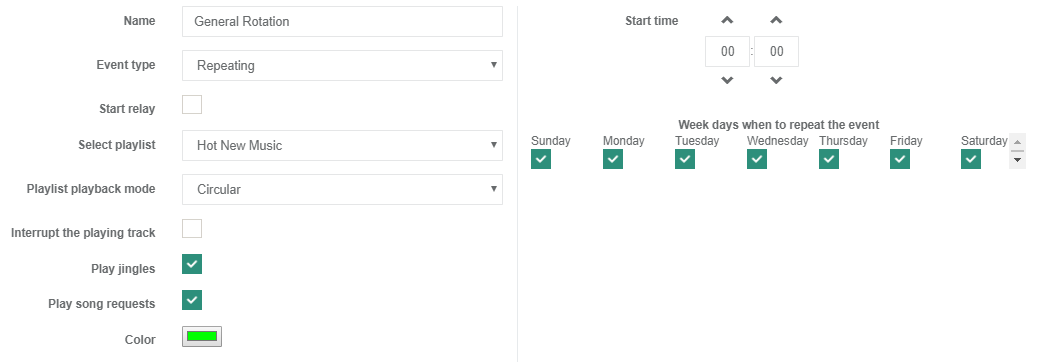
Blocks
To open the Blocks panel, in your Streaming Center panel, click on Jingles on the left, then Blocks. To get started click on the Add new block button
In the example below, we instruct Streaming Center to play a track from our playlist titled Hot New Music (which we created in the playlist section of Streaming Center) at 30 min. after each hour of each day.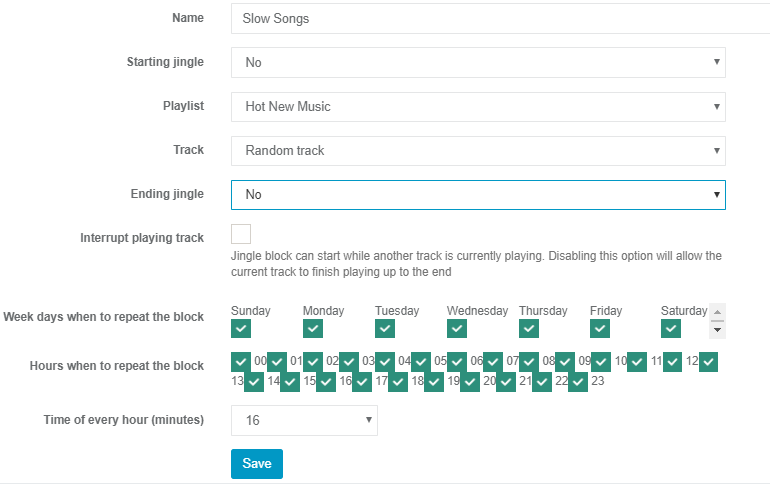
This can be duplicated as many times as you like and used for both standard tracks and jingles. So for our example above, if we wanted to play more music from our "Hot New Tracks" playlist we could set up a few more of these blocks, the more per hour we create, the more music from the Hot New Tracks playlist would play.Â
Tips
- Preventing the same artist from replaying every X amount of tracks is an important step you can take to give your listeners a better mix learn more
- Ensure you have the Restart Server option enabled under Everest cast settings which will automatically restart the server in case of emergency failure
