
You can connect your laptop, desktop or other compatable device to your Streaming Center panel seamlessly and without interrupting listeners. The automated fade from auto dj to live will take place as soon as the DJ logs in.
You will first need to download and install one of many free and paid pieces of software for your Windows or MAC
First you will need to set up at least one DJ by clicking on DJs in your Everest cast panel on the left. After you have created your DJ, you will find the details needed to go live on the right side of the DJ page.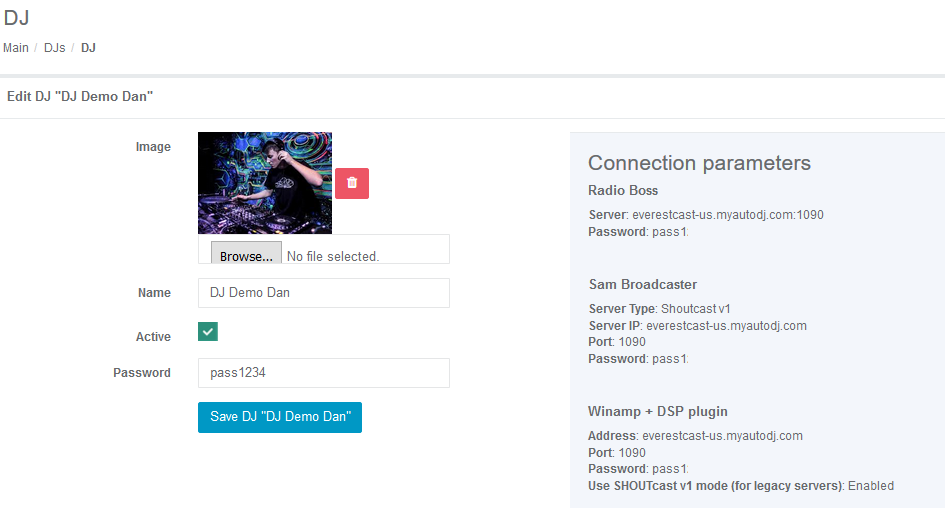
When your DJ connects to Streams Center, they will be broadcasted over all channels (streams) you have set up including Icecast!
Learn how to go live with Rocket Broadcaster
Learn how to go live with BUTT
- Home
-
Store
- Browse All
- Sonic Panel
- My Cast
- AzuraCast
- TV Station/Video on Demand
- Media CP TV/Video
- Streaming Center (Formally Everest Cast)
- Media CP Radio
- Shoutcast Widgets v10
- SHOUTcast Widgets v7
- Reseller Packages
- Website Hosting
- App Builders
- SSL Conversion
- WHMCS Modules
- Register a New Domain
- Transfer Domains to Us
- Announcements
- Knowledgebase
- Network Status
- Contact Us
-
More
